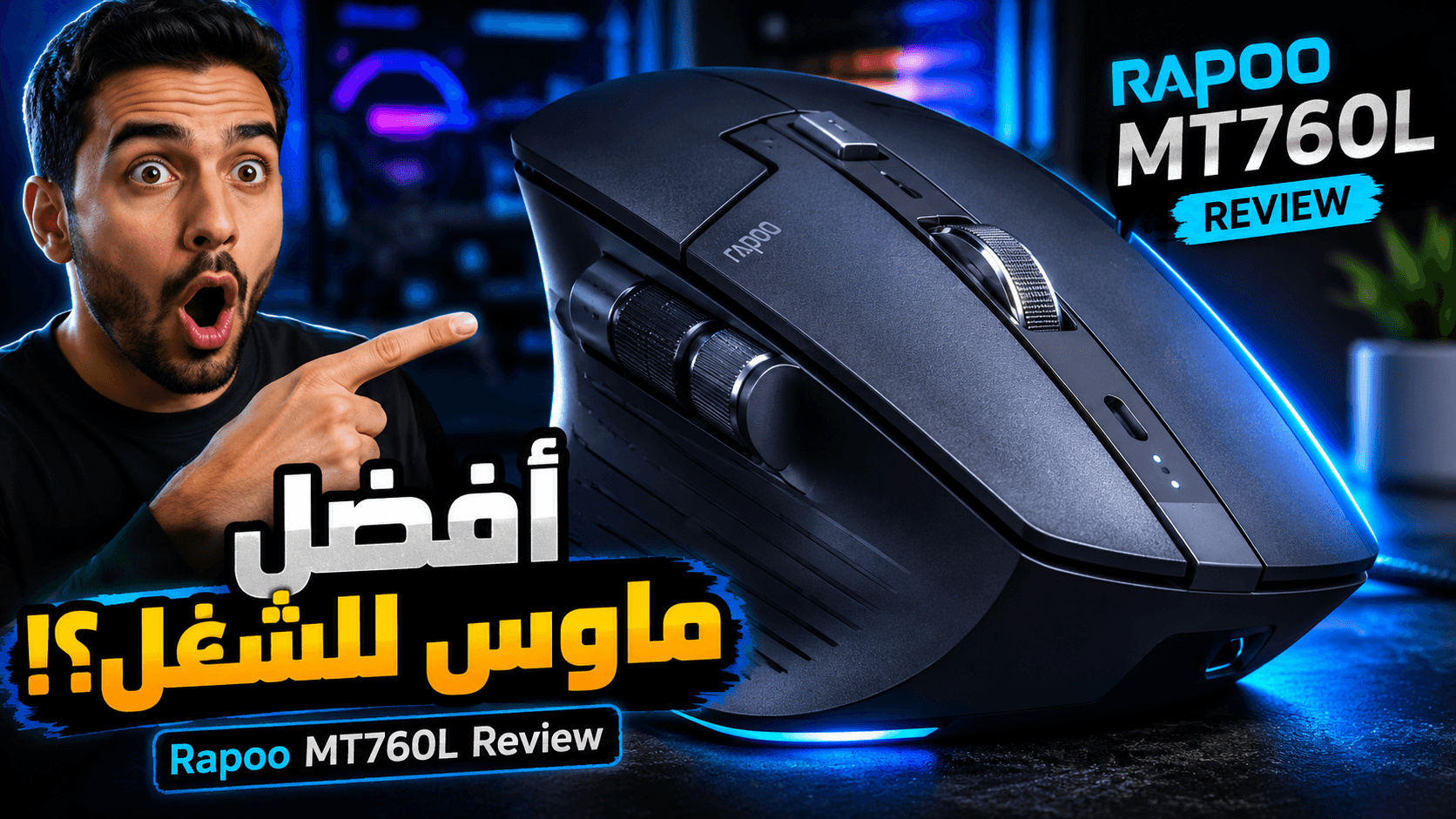
In today's fast-paced, hybrid work environment, the tools you choose can significantly impact your efficiency and comfort. Among the most crucial yet often overlooked peripherals is the humble computer mouse. For professionals who spend countless hours navigating spreadsheets, editing video timelines, or writing code, a standard mouse simply doesn't cut it. Enter the Rapoo MT760L, a productivity powerhouse that promises premium features without the premium price tag.
This comprehensive Rapoo MT760L Review will delve into every aspect of this innovative device. We'll explore its ergonomic design, technical specifications, real-world performance, and how it stacks up against the competition. If you're on the hunt for the best mouse for productivity, the best mouse for programming, or the best mouse for design that won't break the bank, read on. This مراجعة Rapoo MT760L (Rapoo MT760L review) will help you decide if this is the right ماوس لاسلكي (wireless mouse) for your workspace.
Overview of the Rapoo MT760L
The Rapoo MT760L is a multi-mode wireless mouse designed specifically for the modern professional. It's positioned as a direct competitor to high-end productivity mice like the Logitech MX Master series, aiming to deliver a similar suite of features—including multi-device support, a high-precision sensor, and a side scroll wheel—at a much more accessible price point.
The target audience is broad, encompassing programmers, graphic designers, video editors, office workers, and students who need a reliable and comfortable tool for extended use. It's a productivity mouse built for the demands of multitasking and cross-device workflows, making it an excellent choice for anyone looking to upgrade their workspace.
Unboxing Experience
The Rapoo MT760L arrives in a compact, minimalist box that reflects the product's no-nonsense, productivity-focused ethos. The packaging is sturdy and well-organized, with the mouse securely nestled in a molded tray.
Inside the box, you will find:
- The Rapoo MT760L mouse
- A 2.4GHz USB wireless receiver
- A USB-A to USB-C charging cable
- A quick start guide and user manual
One notable inclusion is the two USB receivers, a unique feature that simplifies connecting the mouse to multiple computers without constantly re-pairing. The unboxing experience is straightforward and efficient, setting the stage for a device that prioritizes functionality over flashy presentation.
Design and Build Quality
The design of the Rapoo MT760L is arguably its most compelling feature. It boasts a pronounced, right-handed ergonomic shape with a generous thumb rest, which is designed to reduce hand fatigue during long work sessions. Measuring 125 x 81 x 47 mm and weighing 103 grams, it is a full-size mouse that provides excellent palm support for users with medium to large hands.
The build quality is solid, featuring a durable matte plastic finish that feels robust in the hand. While it may not have the soft-touch rubber coating of its more expensive competitors, the textured surface offers a reliable grip. Some reviewers have noted minor design issues, such as sharp edges that could be uncomfortable for some users, but these are generally outweighed by the overall ergonomic benefits .
Despite being a larger device, its relatively light weight (101g for the L model) helps prevent wrist strain, making it a comfortable companion for a full workday.
Features and Specifications
The Rapoo MT760L is packed with features that cater to power users. Here’s a breakdown of what this Bluetooth mouse brings to the table.
Sensor and Performance
At the heart of the MT760L is the PAW3220 optical sensor, which offers a DPI range of up to 4000. Users can adjust the sensitivity on the fly using a dedicated DPI button, cycling through four preset levels: 600, 1200, 1600, and 3200. This flexibility is perfect for switching between pixel-precise design work and rapid navigation across multiple monitors.
Connectivity: Tri-Mode and Multi-Device
The MT760L is a tri-mode device, offering three distinct ways to connect:
- Bluetooth 5.0 & Bluetooth 3.0: Allows for stable, low-energy connections to laptops, tablets, and other devices.
- 2.4GHz Wireless Receiver: Provides a plug-and-play connection with virtually zero latency.
- USB-C Wired Connection: Allows for use while charging or for users who prefer a wired setup.
One of its standout features is the ability to pair with up to five different devices and switch between them with a simple button press on the underside of the mouse . This makes it an ideal ماوس بلوتوث (Bluetooth mouse) for professionals who juggle a desktop PC, a work laptop, and a tablet.
Productivity-Focused Buttons
The mouse is equipped with 10 programmable buttons, including a unique side scroll wheel. This magnetic, Hall-effect side wheel provides smooth horizontal scrolling—a lifesaver for anyone who works extensively with wide spreadsheets, project timelines, or design software. The main scroll wheel is tactile and responsive, and the clicks are silent, making it office-friendly.
Battery and Charging
Powering the MT760L is a substantial 800mAh rechargeable battery that can last up to 90 days on a single charge, depending on usage. The device charges via a USB-C port, ensuring you can top it up quickly with a modern cable. Additionally, it supports optional wireless charging via a separate magnetic dock, adding another layer of convenience.
Performance Test: Office, Programming, and Design
The true test of any productivity mouse lies in its performance across real-world tasks. The Rapoo MT760L was put through its paces in various professional scenarios.
Daily Office Work and Web Browsing
For everyday tasks, the MT760L excels. The ergonomic shape is comfortable for hours of browsing and document editing. The silent clicks are a welcome feature in shared office spaces, and the smooth-scrolling main wheel makes navigating long web pages a breeze. The dedicated DPI button allows for quick adjustments, ensuring you always have the right sensitivity for the task at hand.
Programming
For programming, the MT760L is a strong contender. The ability to quickly switch between devices is invaluable for developers who test code on multiple machines. The side scroll wheel is perfect for navigating complex codebases horizontally, and the programmable buttons can be assigned to common shortcuts, like copy, paste, or terminal commands, to speed up workflow.
Graphic Design and Video Editing
The high DPI sensor (up to 4000 DPI) provides the precision needed for detailed design and video editing work. The side scroll wheel proves its worth again by allowing for easy timeline scrubbing in video editing software like Premiere Pro or DaVinci Resolve. The multi-device support allows designers to smoothly transition between a workstation and a tablet for sketching, making the MT760L a versatile tool for creative professionals.
Battery Life Review
Battery life is a critical factor for any wireless mouse, and the MT760L does not disappoint. The 800mAh battery is designed to last for months of typical use, with Rapoo claiming up to 90 days on a single charge. Even with heavy daily use, you can expect weeks of reliable performance before needing to recharge. When you do, the convenient USB-C charging makes it easy to power up, and the support for wireless charging modules adds a premium touch.
Advantages of the Rapoo MT760L
- Excellent value for money: Delivers premium features at a fraction of the cost of competitors.
- Superb ergonomic design: Full-size shape with a thumb rest provides all-day comfort for medium to large hands.
- Versatile tri-mode connectivity: Supports Bluetooth 5.0, 2.4GHz dongle, and USB-C wired connections.
- Multi-device support: Pair with up to 5 devices and switch between them effortlessly.
- Productivity-enhancing features: Includes a dedicated side scroll wheel and 10 programmable buttons.
- Long-lasting 800mAh battery: Offers up to 90 days of battery life on a single charge.
- Onboard memory: Stores settings directly on the mouse, making it perfect for use on multiple or secure computers.
Disadvantages of the Rapoo MT760L
- Not ideal for small hands: The large size may be uncomfortable for users with smaller hands.
- Software limitations: The driver software is currently only available for Windows; Mac users cannot customize settings.
- Build material: While durable, the matte plastic feels less premium than competitors' soft-touch coatings.
- No free-spin scroll wheel: Lacks the hyper-fast scrolling feature found on higher-end mice like the MX Master 3S.
- M+ Cross-Computer features require setup: While powerful, the cross-device file transfer feature requires a software install and network configuration.
Comparison With Competitors: Rapoo MT760L vs Logitech MX Master 3S
When discussing productivity mice, the Logitech MX Master 3S is the benchmark. However, the Rapoo MT760L emerges as a formidable alternative, particularly for those on a budget.
| Feature | Rapoo MT760L | Logitech MX Master 3S |
|---|---|---|
| Price | Much more affordable (Approx. $49 / ₹4,499) | Premium (Approx. $99) |
| Weight | Lighter (101g) | Heavier (141g) |
| Scroll Wheel | Standard tactile wheel | MagSpeed electromagnetic (with free-spin) |
| Software | Rapoo A HUB (Windows only) | Logitech Options+ (Windows & Mac) |
| Max DPI | 4000 | 8000 |
| Onboard Memory | Yes | Yes |
| Build Material | Matte Plastic | Soft-touch rubber |
The key takeaway is that while the MX Master 3S offers a slightly more premium experience and advanced features like the MagSpeed scroll wheel, the MT760L provides exceptional value and a remarkably similar core experience at a much lower price.
Who Should Buy the Rapoo MT760L?
The Rapoo MT760L is a versatile tool that can benefit a wide range of users.
- Programmers: Who need a comfortable mouse for long coding sessions and efficient navigation across multiple devices. It's easily one of the أفضل ماوس للبرمجة (best mice for programming) in its price range.
- Designers and Video Editors: Who require precise control and the convenience of a side scroll wheel for timelines and canvases, making it a great أفضل ماوس للتصميم (best mouse for design) option.
- Office Workers: Who spend their days in spreadsheets, emails, and documents, and will benefit from the ergonomic design and silent clicks. This is an office mouse that truly delivers.
- Students: Who need a reliable, affordable, and versatile mouse for research, writing, and multitasking.
- Hybrid Workers: Who frequently switch between a desktop at the office and a laptop at home.
Frequently Asked Questions (FAQ)
1. Is the Rapoo MT760L compatible with Mac?
While the mouse can connect to a Mac via Bluetooth, the configuration software is currently only available for Windows, meaning you cannot customize button functions or DPI settings on a Mac.
2. How long does the battery last on the Rapoo MT760L?
It features an 800mAh battery that provides up to 90 days of use on a single full charge.
3. Can the Rapoo MT760L connect to multiple devices?
Yes, it supports up to five paired devices (via Bluetooth and the 2.4GHz dongle) and allows you to switch between them easily.
4. Does the Rapoo MT760L have a side scroll wheel?
Yes, it features a magnetic side scroll wheel for horizontal scrolling, which is incredibly useful for spreadsheets and design work.
5. Does the Rapoo MT760L work on glass?
While the optical sensor is precise, it is not specifically designed to work on glass surfaces. It performs best on wood, fabric, and standard mouse pads.
6. What is the DPI range of the Rapoo MT760L?
The DPI is adjustable up to 4000, with preset levels of 600, 1200, 1600, and 3200.
7. Is the Rapoo MT760L good for small hands?
No, the MT760L is a large mouse designed for medium to large hands. For smaller hands, Rapoo offers the MT760 Mini.
8. Does the Rapoo MT760L come with a USB receiver?
Yes, it comes with two 2.4GHz USB receivers, allowing you to connect it to two different computers without re-pairing.
Final Verdict
The Rapoo MT760L is a standout productivity mouse that punches well above its weight. It successfully bridges the gap between premium features and affordability, offering a comfortable ergonomic design, robust tri-mode connectivity, and a suite of productivity-boosting tools like the side scroll wheel and multi-device support.
While it has minor drawbacks, such as the lack of Mac software and a slightly less premium feel than its top-tier competitors, these are easily forgiven given its aggressive price point. For the vast majority of professionals, whether you are a programmer, designer, or office worker, the MT760L provides everything you need to enhance your workflow and comfort.
If you are in the market for a new wireless mouse and want the best bang for your buck without sacrificing essential features, the Rapoo MT760L is an easy recommendation.